/ Often Software / Product / Exportify

Exportify.
The customizable
order export app
for Shopify.

Format your Shopify orders into the exact file your accounting, fulfillment, 3PL, or production system needs. Excel, CSV, XML, delimited text. Custom templates, calculated logic, scheduled SFTP delivery.

App Store
★★★★★ 4.7 · 57 reviews
Install Exportify
15-day free trial · From $14.99/mo
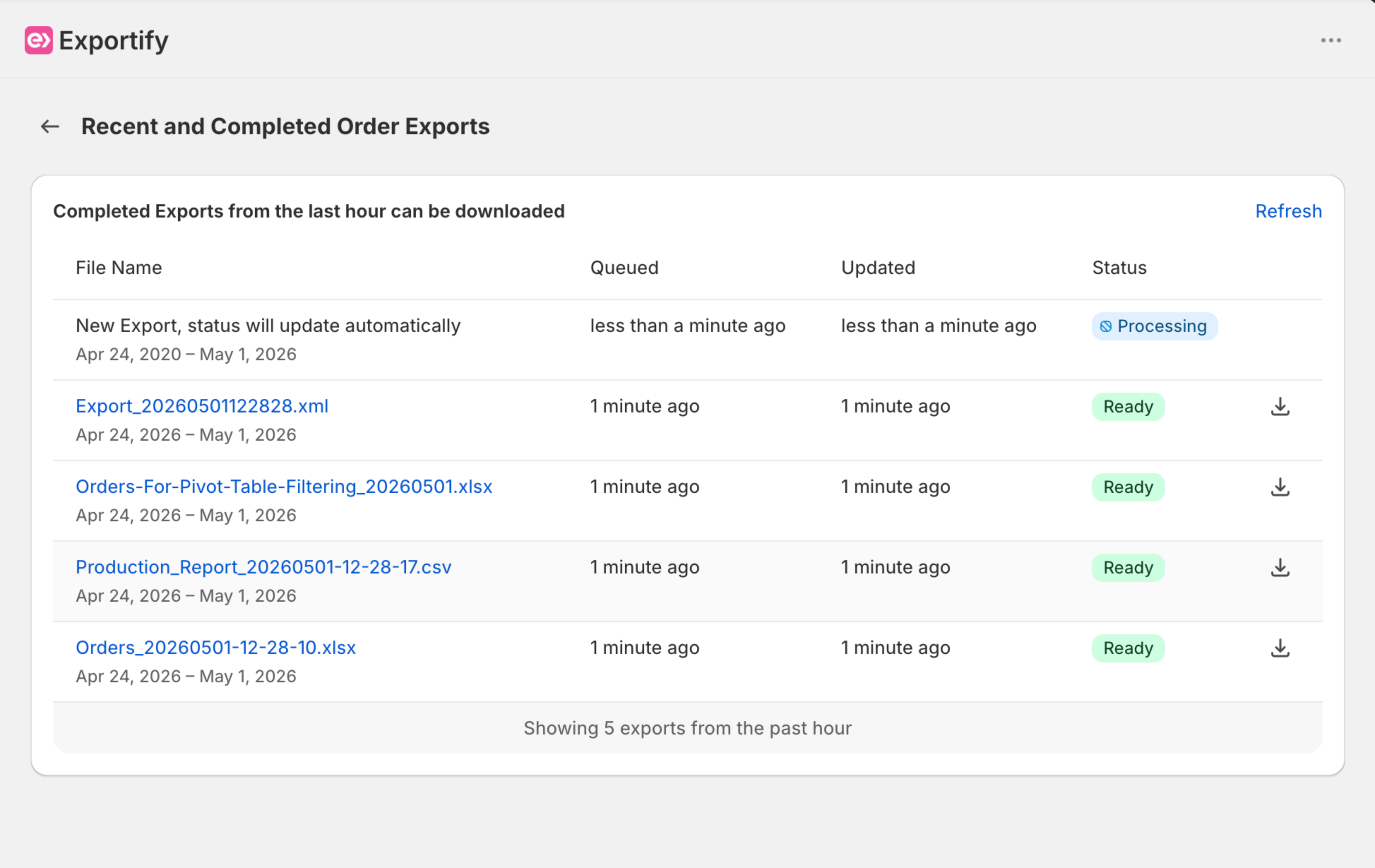
/ 01 Run an export
Exportify dashboard with recent and completed exports
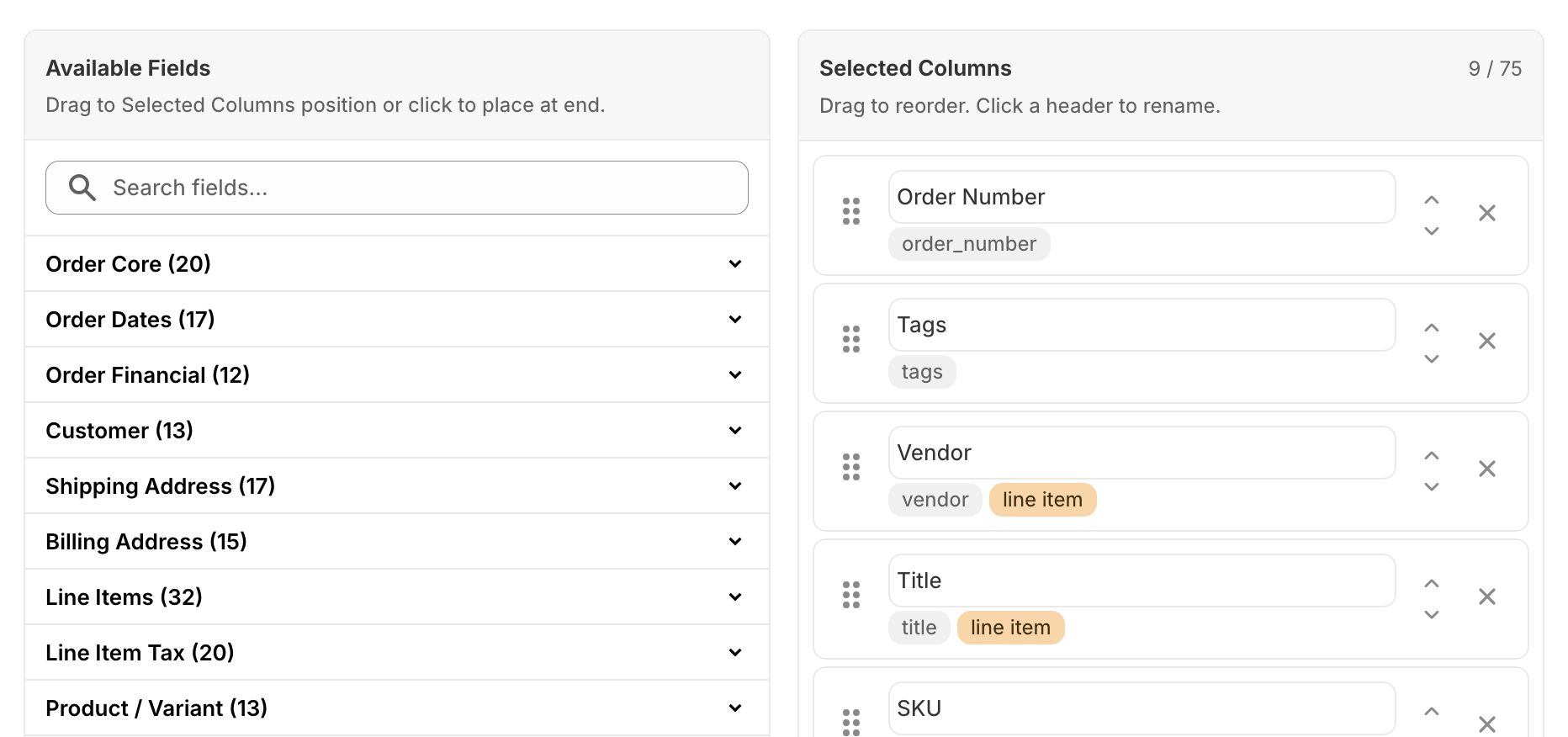
/ 02 Build a template
Drag-and-drop field and column builder
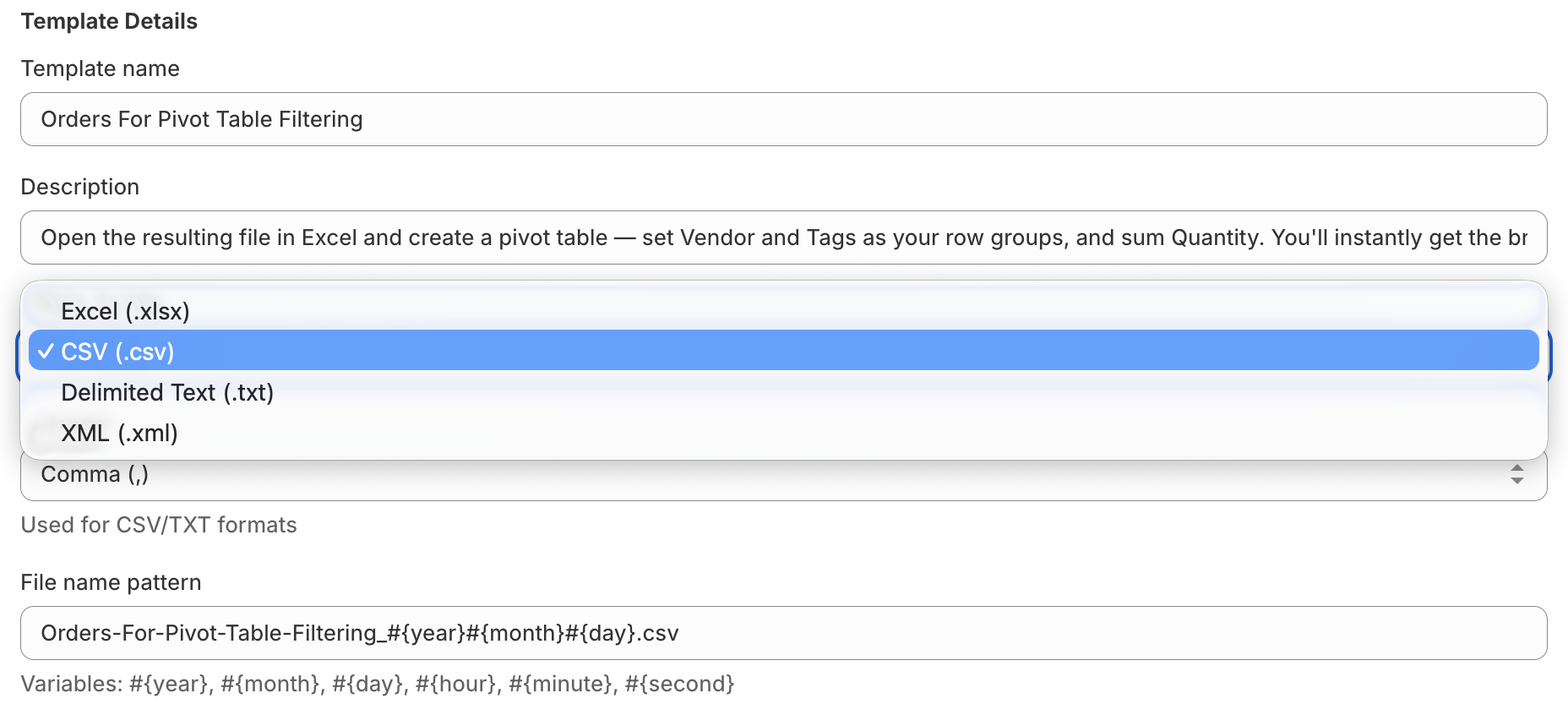
/ 03 Pick the format
Choose Excel, CSV, Delimited Text, or XML output
/ Features

Built for merchants who need more than the default CSV.

/ 01 — Custom templates

Drag-and-drop column ordering.

Build up to 1 template on Basic, 5 on Standard, or 10 on Advanced. Reorder columns, rename headers, choose which fields appear, and save reusable formats per workflow.

SUPPORTED OUTPUTS
.xlsx Excel
.csv Comma-separated
.xml With your schema
.txt Tab / pipe / custom
/ 02 — File formats

Excel, CSV, XML, or any delimited text format.

Pick the format your downstream system expects. Custom delimiters, file-name patterns with date variables, UTF-8 throughout.

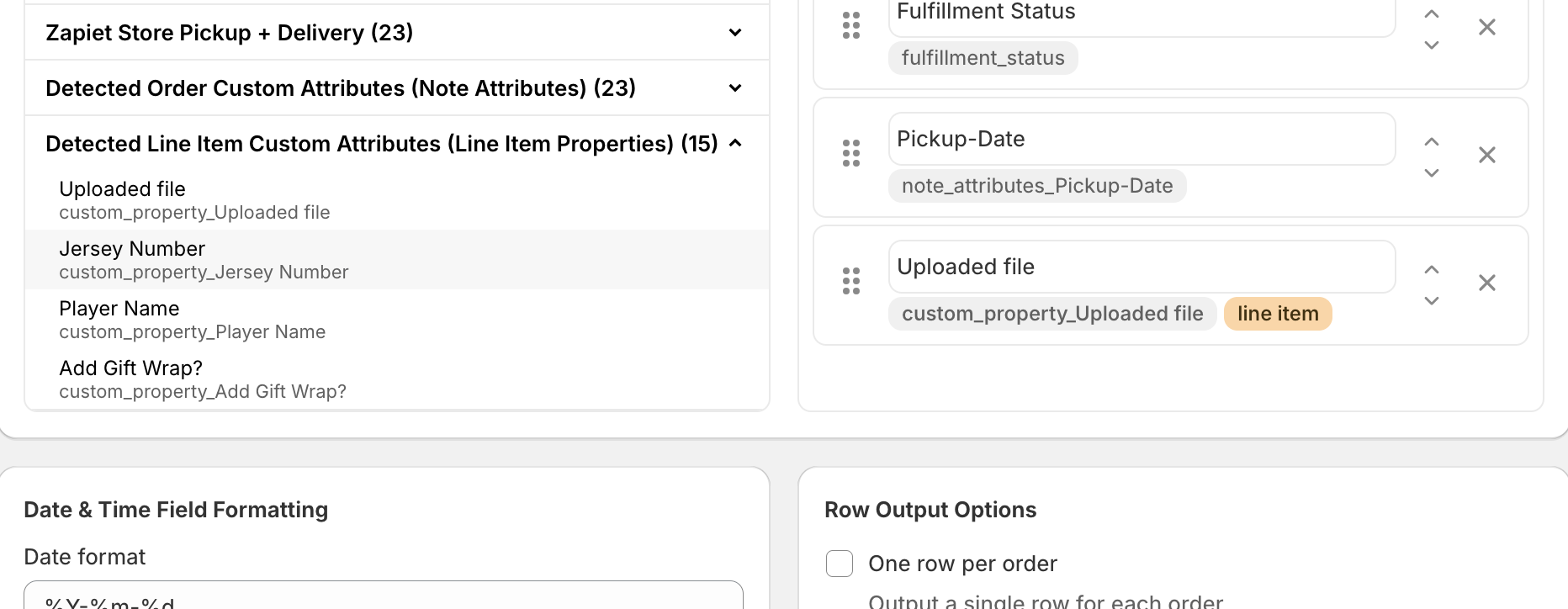
/ 03 — Custom fields

Auto-detected from your orders.

Line Item Properties and Order Note Attributes are surfaced in the template builder. Included on every plan.

Daily · 06:00 UTC
sftp://your-3pl/incoming
Set up by Exportify Support
/ 04 — SFTP delivery

Scheduled SFTP delivery on the Advanced plan.

Drop exports straight into your in-house systems, 3PL, or warehouse. Our team configures the schedule and destination for you.

/ 05 — Calculated fields

Logic our support team builds for you.

Conditional formatting, derived columns, complex filters — included on Standard & Advanced.

/ Use cases

Built around the workflows merchants actually need.

Apparel
& custom goods .

A jersey shop printing names and numbers, a bag maker monogramming initials, a candle brand etching personalized lids.

Each order carries line-item properties — sizes, colors, names, jersey numbers, uploaded files. Send the production team a tidy file with exactly those fields, in the exact order they expect, every time.

Exportify features in play
Line Item PropertiesCustom templatesPer-line rowsCalculated fields
3PL
& fulfillment .

Brands handing off pick-pack-ship to an outside warehouse, dropshippers feeding suppliers, ops teams syncing to a WMS.

Match the exact CSV or XML schema your 3PL or warehouse system requires — including custom fields like pickup methods, delivery windows, and SKUs the way they format them.

Exportify features in play
Custom XML schemaScheduled SFTPOrder tag filtersLocations
Multi-channel
& wholesale .

DTC brands also selling on B2B, marketplaces, or pop-ups; wholesale-heavy stores producing weekly fulfillment runs.

Batch by date range, status, or tag and produce a separate file for each downstream destination — accounting in Excel, EDI partner in pipe-delimited text, ops dashboard in CSV.

Exportify features in play
Date-range batchingTag filtersFile-name patternsMultiple templates
Reporting
& finance .

Category managers running pivot tables, finance teams reconciling refunds and tax, ops leads cutting weekly summaries.

Pull the precise mix of order, financial, and tax fields you need for reporting — including derived columns built by our support team — without having to manually edit Shopify's native export.

Exportify features in play
Tax & financial fieldsCalculated columnsExcel outputNo manual editing
/ Integrations

Plays well with the apps your store already depends on.

Shopify Admin

Native order, line item, and customer fields.

BOLD Product Options

Auto-detects every line item option you collect.

Infinite Options

Customer selections available in the custom export template builder.

Zapiet Store Pickup + Delivery

Pickup location, date, and time fields ready to go.

Product Customizer

Personalization fields exported alongside the order.

Custom theme fields

Note attributes are picked up automatically.

Your in-house systems

Map fields to the exact shape your internal tools expect.

Your 3PL / WMS

Scheduled SFTP drops in the format they expect.

/ Pricing

Three plans. 15-day free trial on all.

Basic
$14.99/30 days
or $149.99/year — $29 off
  • Build up to 1 custom template yourself
  • All Basic default templates
  • All Shopify Order & Line Item fields
  • Custom Attributes (order & line item)
  • Excel, CSV, Delimited Text, XML output
Start free trial
Advanced
$49.99/30 days
or $499.99/year — $99 off
  • Includes all Standard plan features
  • SFTP delivery for automated exports
  • Scheduled & webhook-triggered exports
  • Build up to 10 custom templates yourself
Start free trial
All charges in USD. Recurring and usage-based charges are billed every 30 days.
"
The Exportify team is truly the best. They’ve made downloading daily reports for me and my team a dream — so helpful, and they truly go above and beyond with any of our requests.
P
Petite Keep
United States · 4 years on Exportify
"
Great app, report is easy and the team is super responsive!
C
The Christmas Tree Stand
United States · 2 years on Exportify
"
The team is very helpful and everything works exactly as needed.
E
EliteRelief
Australia · 10 months on Exportify
/ FAQ

Common questions, straight answers.

Can Exportify export to XML?
Yes. Exportify supports XML output in addition to CSV, tab-delimited text, and Excel formats. Our support team can help shape the schema your downstream system expects.
Can Exportify export to SFTP?
Yes — SFTP delivery is included on the Advanced plan. Our support team configures the schedule and destination for you, so it just runs once it’s live.
What permissions do users need to export?
Any staff account with access to Orders can run an export. We don’t require admin-level permissions.
Can I export more than 50 orders at a time?
Yes. The 50-order cap only applies to Shopify’s native filtered selection. Exportify’s own filters — status, location, date range, order tags, or selected orders — have no such limit.
Does Exportify charge paused Shopify stores?
No. If your store is on hold or paused in Shopify, Exportify isn’t running and we won’t bill you.
Can I get tracking numbers in my export?
Yes — fulfillment tracking codes are available as fields in the template builder.
Can Exportify split exports into separate files?
Yes — split by location, date, status, or any custom rule. Talk to support and we’ll build the logic for you.
What integrations are supported out of the box?
BOLD Product Options, Infinite Options (ShopPad), Zapiet Store Pickup + Delivery, Product Customizer, plus any Line Item Properties or Order Note Attributes saved on orders.
Browse the full Help Center

Set up your first
custom export template
in minutes.

Install from the Shopify App Store, build a template, run an export. We’re on the other end of the chat if you get stuck.